A new preset contribution has arrived - City Scapes
Brandon from x-equals.com is a new contributor to presetsheaven. Today I’m posting a review of his latest preset called “City Scapes“. From my point of view it lightens up those dull images into clear shiny ones. This preset works best on photos that have an average lightness and darkness. If your photos have a bright overall look, the preset most likely will burn out the white areas in them. To be sure this not happen, try decreasing the amount of the exposure adjustments in Lightroom.
I love statistics when they are positive.
It has almost gone two month since I started presetsheaven and I must say it has been a total success for me and my ego:-). All the positive response from YOU really makes me go on doing this. Since my very first post, over 400 people have joined my RSS subscription. 45 are subscribing to my newsletter. Read more
34 free Black & White film presets for Lightroom
Michael is a photographer who is devoted to black and white film. You might have seen some of his work on his flickr page. He posted this collection of presets in the presetsheaven flickr group. Shortly after, he contacted me and said I could post his work here if I liked it. And I did so here it is;. The collection of MikeyGs Black and White Film presets. Read more
Tutorial: How to remove spots on multiple photos
Yesterday I posted a tutorial article about how you easily can remove dust spots from your photos. It didn’t take long time before someone asked me how they should do if they have like hundreds of photos with the same pattern of dust-spots. So here comes part two of “how to remove spots with the spot removal tool in Lightroom 2.” Read more
“Frosty Season” makes your photos freeze
If you’ve been following me by Twitter or RSS today, you’ve seen I’ve been busy updating my site with new material. I felt I couldn’t end this update galore without publishing a new preset for you, my friends out there! I call it Frosty Season cause it gives your photos a blue frosty look. Read more
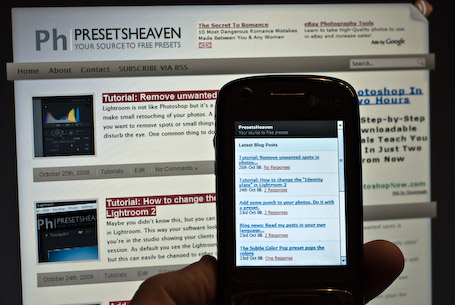
PresetsHeaven goes mobile…
Today I’ve made presetsheaven mobile. So from now on you can read my posts in your iPhone, Windows mobile or Nokia phone etc. Now that my site is customized for your phone, why not take the time to read my latest articles while sitting in the bus or during that boring meeting at work
Tutorial: Remove unwanted spots in photos…
Lightroom is not like Photoshop but it’s a great tool if you just want to make small retouching of your photos. A perfect use for this is when you want to remove spots or small things in your photos that might disturb the eye. One common thing to do in the digital world is to remove “dust spots”. These spots often become visible if you change lenses on your camera in a non-clean environment. They get trapped in your camera house and after that, all your photos will have the spots on them. Read more
Tutorial: How to change the “Identity plate” in Lightroom 2

Maybe you didn’t know this, but you can customize the Identity plate in Lightroom. This way your software look really professional when you’re in the studio showing your clients the result of the photo session. As default you see the Lightroom logo as the identity plate, but this can easily be changed to either custom text or image. Read more
Add some punch to your photos. Do it with a preset.
“Nate” has contributed to my site earlier with some nice presets. Today he did it again. This time it’s a special contribution because this preset is exclusively published ONLY on presetsheaven.com. It’s called “Elsie” and it’s one of many nice presets from his collection called “Wonderland Presets Autumn Essentials Pack”. If you’re looking for a preset that adds some punch to your photos, this might be The one! Read more
Blog news: Read my posts in your own language…
Hi, hola, hej, Привет, salut!
You can make your own choice now. I’ve made it easy for you non-english visitors to translate all my posts into your own language. Pretty useful right?
All you have to do is to use the google translation tool which you can find in the bottom right corner of this page (see the footer).
I hope you enjoy this new feature.
That’s all for now folks,
Cheers, Pierre