Lightroom 3 public beta is here!
Today you can download the latest release of Lightroom 3 beta. The Adobe team have really made some nice adjustments on this release compared to LR 2 with lots of new and improved functions.
What’s new in Lightroom 3?
There are so many new things so you should really download a copy of the beta release yourself, to try them out.
Scott Kelby from Photoshop Insider has written a great post about some of the new features. Check it out:
(1) Importing has been redesigned with a new import window that lets you easily see where your images are coming from and where they’re going, with lots of little improvements and enhancements to make the process easier and much more visual.
(2) Drag and Drop Publishing to the Web (and more). Now you can just drag and drop an image to have it automatically published directly from Lightroom right up to Flickr, or directly to an iPhone sync folder, etc..
(3) Pro-level Noise Reduction. This is an area that Lightroom always lagged behind on, but now they have real pro-level noise reduction which competes, or beats, about anything out there (especially because it can do its noise reduction at the Raw file level, rather than on a processed 8-bit file).
(4) Built-in Film Grain feature. There’s been a lot of buzz recently about bringing back that film-grain look, and now that’s built right in.
(5) Better vignetting by a long shot. They really enhanced the post crop vignetting, and now post crop gives you a much better looking, and more natural result (and you have two choices for the type of vignetting effect as well).
(6) You can finally (finally, finally!!!!!) export a slideshow with music embedded in the slideshow (at last), and you can have your slideshow automatically sync the length of the slideshow to the length of your song. Plus, they made it so, on a Mac, you don’t need to use iTunes to host your slideshow music.
(7) Real watermarking is here! Now you can create real watermarks, at different sizes and opacities, and put them where you want them, for both web and print.
(8) Create print layouts with photos wherever you want them. Now there’s a Custom Print Package feature that lets you put as many photos, in whatever shape and size, on the page wherever you want them (you’re no longer restricted to use a grid of uniform cells), so now you can really come up with some creative print layouts without having your hands tied.
(9) You can change the background color for prints. Now you can choose any color as your background for printed pages. I know it sounds like a little thing, but it’s big.
(10) The Collections panel is now in the Develop Module, too. This one addition will dramatically increase your efficiency because now you don’t have to constantly switch back and forth between the Library Module and Develop Module, because you can get to all your collections and images from right within the Develop Module itself.
Check out these three videos to see what’s new in Lightroom 3:
Part one:
- Library and develop modules
- New streamline import function
- Improved sharpening tool and color noise reduction
- More natural vignetting and… Add Grain!
- Faster!
Part two:
- New ways to share and publish images (Direct access to your Flickr account)
- Add sound to your slideshows
- Custom package in the Print mode for better layouts
- Edit watermarks (text or image)
Part three:
- 25+ new features
- New crop presets
- Sort images based on cropped size
- New option for overlay info in loupe view
- Turn autosync (new feature) on and off in the loupe view
- Create and import new folders and images easier
- “Show photos in subfolders” easier to set on/off
- New improved Collection functions
- Lock library filters
- Filter images on flash state
- Find missing files
- Back-up on exit
- Access to Collections in the Develop mode
For more details on the new functionality in the Lightroom 3 beta:
- Read the blog post from the Lightroom team to learn about the vision behind the features included in the beta.
- Find helpful resources on the new NAPP Lightroom 3 beta Resource Center.
- Read the release notes (PDF) for detailed information.
Lightroom 3 SDK for developers will be released when Lightroom 3 is out on the market (according to the Adobe forum)
They want to turn Polaroid back to life
A team called “The Impossible Project” have settled an agreement with Polaroid to use their old factory in Holland.
They now plan to re-start the production of the legendary analog Integral film.
News: Presetsheaven changing clothes again…
I’ve just updated the layout of presetsheaven.com once again. This time I’ve added a couple of nice features that I hope You all will like.
From now on I will highlight featured content such as popular articles and presets at the main page. This will give you a great overview of what you can find in my “candybox”.
Blog news: Read my posts in your own language…
Hi, hola, hej, Привет, salut!
You can make your own choice now. I’ve made it easy for you non-english visitors to translate all my posts into your own language. Pretty useful right? :-) All you have to do is to use the google translation tool which you can find in the bottom right corner of this page (see the footer).
I hope you enjoy this new feature.
That’s all for now folks,
Cheers, Pierre
Give a personal touch to all your comments…
![]()
Did you know that you also can have a thumbnail like this shown with your comments?
This is something many people still don’t know about, but there is a very nice online service called gravatar.com which makes this possible.
On gravatar.com you can register your email address and upload an image you want to use as an avatar/thumbnail. Every time you use this mail address on any gravatar-compatible website, blog or forum, it will automatically be visible. If you want to replace your avatar image with a new one, just log in to your gravatar page and upload a new one. On all sites you earlier have been writing (with the same mail address), this avatar will be exchanged to the new one! Sweet right!?
If you have posted comments here on presetsheaven, please remember to use the same mail address when you register your gravatar.
Is this something for you?
Well, I for sure like it since it gives a more personal touch to the posts I make “out there”.
Blog update: Small but helpful feature for you!

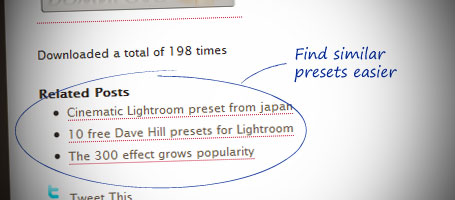
Today I updated the blog with a small but great feature that I think you all going to love. All my posts with presets and tutorials will have a section called “Related Posts” in the bottom. This will surely speed up your browsing experience when you are looking for a specific type of preset. I will try to categorize all my presets as good as possible to make it easy for you to, for example, find all other related posts with Black & White styled presets.
081016: I’ve just implemented this feature so some of the posts might still be without related posts.
Enjoy the update!
Best regards, Pierre
BIG NEWS: Presetsheaven has a new design

Hi folks!
I’ve been thinking of redesigning the layout of presetsheaven for some time now. Yesterday I finally did it. The concept is simple. I wanted to make the site more attractive by lighten it up a bit. Another great thing that you might like is the thumbnail for each post. This will definitely make things easier when you are browsing around.
All functions like “subscribe by email” or “RSS subscription” are still here as well as my twitter updates. They just have a different look. :-)
The amount of subscribers grows everyday which is very pleasant to see. Keep it up, it makes me work harder for all of you :-)
I would love to read your comments on the new design, so please take your time and use the comment field below. If you are new here and haven’t seen the old site before, you’re still welcome to comment your thoughts ;-)
Cheers!
Pierre