

If you’re a happy mac user and you’ve been missing the Tether (See your shots “live”) function in Lightroom 2, you probably going to be even happier now.
Mountainstorm has released a free plug-in callet LightroomTether. This plug-in works together with another free software for Mac, called StudioTether.
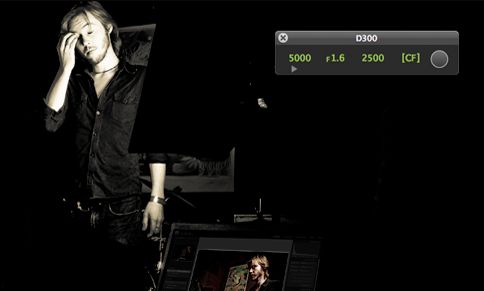
Tethering your camera, fast and easy:
Taking photos in the studio is so much easier if you can see what your doing.
StudioTether is a free application to tether your camera to your Mac.
LightroomTether is a plugin for Adobe Lightroom v2 which automates the running of StudioTether and importing of these photos into Lightroom. It provides an easy to use interface which automatically configures/starts StudioTether. Due to the integrated nature of the plugin, it provides much better performance than using Lightrooms “Auto Import folder” feature.
Feature overview:
- Remote control of your camera & onscreen display of camera settings
- Nikon LiveView support at 60fps! (recording coming soon)
- Instant import of images into Adobe Lightroom; no waiting for Lightroom to detect the images
- Integrated with Adobe Lightroom; single configuration
Currently the plugin supports cameras from Nikon, Canon and Fuji (see a full list of supported cameras)
Read more and Download the software for your Mac here
Too bad I’m on a PC then…
If you’re on a PC you can try this script which is suppose to do the same job:
http://www.diyphotobits.com/2008/05/23/free-tethered-shooting-script-for-nikon



This is a cool plugin. Works well for me … then again I am perhaps bias being the developer.
Thanks for the plug
Rich
http://www.mountainstorm.co.uk
Nice tool, but doesn’t work with my EOS 40D, 10D and 5D. Pleaaaaaazzze make that work. It’s always a long proceedure to capture pics by using the EOS Utility and the Lightroom auto import.
Would have been great, but Live View does not work with my D90, even with correct settings as specified in instructions.
Any plans to release an LR3 version?