

I’ve never been a fan of the included print-templates in Lightroom. In fact, most of the software I’ve tried with similar templates doesn’t meet my demands. Using Print templates in Lightroom is perfect when you want to create collages of photos. The best is that you can select if you want to print them or save the prints as a file on your computer. Print to file (JPEG) is perfect when you want to create collages for your blog or webpage.
How to install Print Templates into Lightroom
Installing Print Templates into Lightroom is as easy as it is to install presets. Just open the Print module in LR and right click on “User templates” and select “Import”. When you’re done all imported presets should be available in the list.

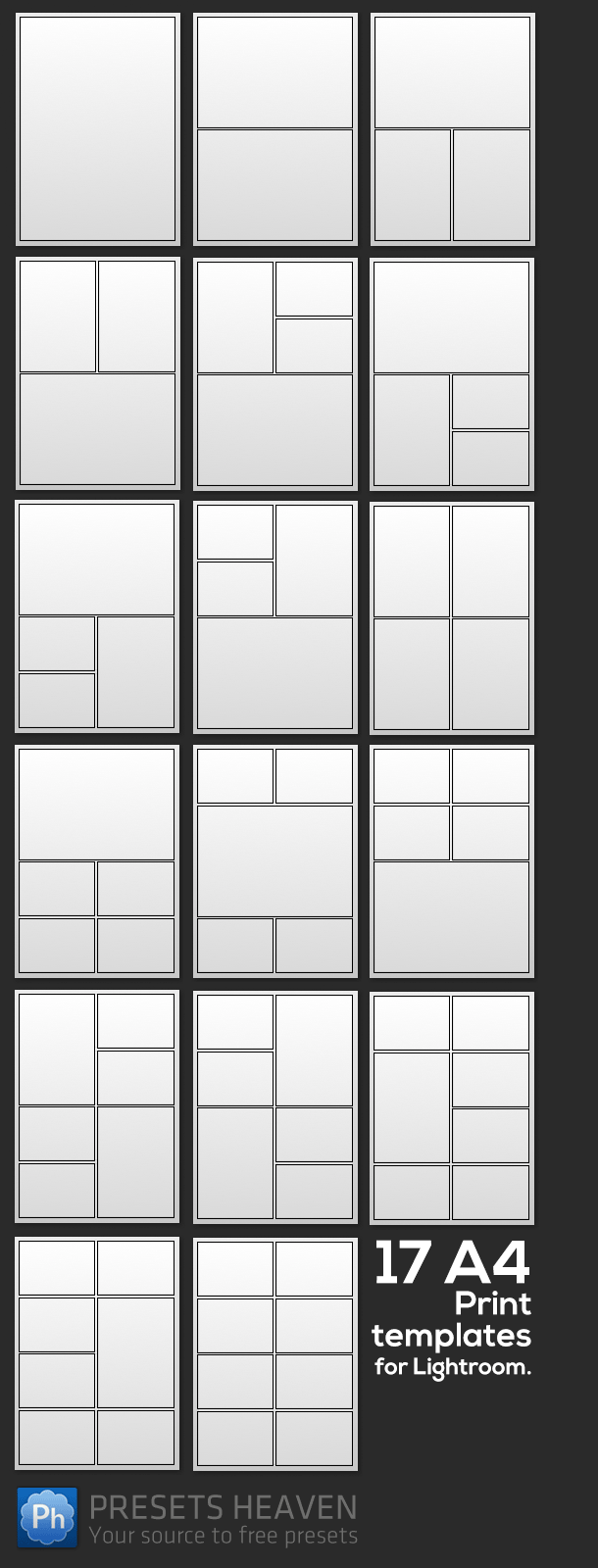
Check out these 17 A4 Print Templates for Lightroom that I made earlier this week. After you’ve downloaded them, please let me know what you think of them.
Update 2013-01-09: Don’t miss the US-letter version that can be downloaded from here.
Layout Preview:Â


Can’t get these to import properly. Rather than shown, the boxes appear left justified rather than centred within the page and the templates with larger numbers of cells have the cells overlapped. Don’t understand what is wrong. Using LR 4.3.
Hi thebabycub.
Please make sure you have set your page format to A4-size since these print-templates are made for this size.
Thanks
/Pierre
Thanks, Pierre. These look great. Merry Christmas to you and yours.
Thank you Sunny!
Love them! Thank you very much! Last minute Christmas presents sorted!
Pierre, thank you so much for this generous gift! I am new to LR, but I was able to successfully import them! A Christmas miracle for sure! I appreciated your instructions on how to do that. I am excited to try these out. You are right, I think I am going to love them! :)
:-)
Hi Diane,
Great job. Hopefully you will have much joy using them for your photos.
/Pierre
Any sized for North Americans? Unfortunately Canada follows the US in paper sizing.
Hi Don,
Will probably create a version for you “Letter”-folks later. ;-)
Thanks!
Pierre
Hi Pierre,
Thanks for your generosity, these templates will be very handy and save me some time too!! I do have one question, how can I export the layout as a page to post on the web?
I’d like to wish you and everyone that reads this blog a Healthy, Happy and Prosperous 2013.
Namaste’
Bob
Hi Bob,
Instead of printing The layout to a printer you can select “to jpeg file”.
Wish you a happy new 2013!
Thanks,
Pierre
Thanks Pierre,
Best Wishes to you for a Happy, Healthy, Prosperous 2013
Namaste’
Bob
Thanks Bob. :-)
Hi again Don,
Just wanted to let you know that the US letter sized version now is available for download here: 17 US Letter print templates
Thanks,
Pierre
hi Pierre,
i’m doing something wrong. i imported the A4 printer presets, and i’m actually using A4 sized paper, but none of the presets will either display the photos in the cells, or light up the Print button for printing. I’ve selected photos in the Filmstrip, of course. i’m stumped! thanks and take care.
Hi MJ Klein,
I’ve made these templates very loose, meaning you just have to drag and drop photos from the filmstrip to each frame in the template.
This way it’s easy to place them exactly were you want them. :-)
Tip: If you hold down CTRL/CMD you can reposition a photo within a frame.
Thanks,
Pierre
thanks Pierre! i knew it was something i was not getting, lol.
Love it! Just came across these today and will certainly be giving them a try. I think they will work great for showing the before and after of shots when talking about post production as well as a nice story board layout.
Thanks for taking the time to create and share these. Appreciate it.
I don’t know what’s going on =/ I downloaded them but when I go to import them into LR it says it is the wrong format. (.zip) Any suggestions? Thank you
Hi Dee,
You need to extract the .zip file first.
Simply double-click it to see if it works (if not let me know).
Thanks Pierre,
Great job! I was looking for something that does this, cause the templates that come with Lr aren’t really handy. Unfortunately, I experience the same problem as thebabycub above. The frames stick to upper left corner leaving a double margin to the right and to the bottom. How can I make them being centered horizontally and vertically? I reassured myself that the paper format is A4 (PDF printer). Anything else I should check for?
Thanks again.
Hello, I’m using LR since a few months, still have to learn a lot. Your preset print templates will very helpful to create different prints!
thanks!!
grtz,
chris
can you use these on fb?
Thanks for sharing.. these are great! :)
Hi, can’t see the templates in LR. Any suggestion please?
Hi Pam,
You need to be in the print-section before you import the templates.
Thanks, Pierre
ok! but where is it is please?? thankx
Hi again Pam,
I’m not really sure what you mean by “where is it”? Can you please be a little more specific what you mean? Also, I’ve updated this post with a new image showing you what the print templates will look like in the “preset list” when imported.
Have you followed the instructions (see in this post above) on how to install the print templates? Did you extract the downloaded zip-file before you tried to import them?
Thanks, Pierre
Thanks you so much for these! This is just what I needed for my blog!
Hey! Could you help me and tell me how can I export the templates to .jpeg? Can´t find the export button like it in develop section.
Thanks a lot!
Hey Sheyn,
You need to “Print to file” in order to “export” the images when you are in the Print mode.
Thx
Pierre
Sorry for the stupid question, but where can I find the “print to file” button? :)
Hello again Sheyn,
You select “Print to: JPEG” under Print Job: https://www.dropbox.com/s/nogxuij8cs439vo/Screenshot%202014-01-03%2022.43.35.png (screenshot)
Thanks, Pierre
Hi Pierre
thank you so much for these. I have a silly question. Is there any possibility to save these in jpeg format to give to someone on cd maybe
Lots of love
xx
Love these!!!!! Thank you!!
I am using Lr CC (2015) and am having a similar problem toone of your earlier comments, the outline of each photo (or set of photos) is not centred on the page – not filling the available space. I have set the page size to A4 and am using A4 paper. What am I doing wrong?
Thank you!
Hey. I just discovered your presets. Thank you. I am new into using photocollages in lightroom. So its a lot of fun. You have a pro version ? More?
I wanted to ask you if in the free ones i can put the pictures together, so no space between them? Is that posible ?
I have içmported these and they all show as A4 bu the actual emplate is right up to the left. The previews look ok bu the actual templates have no left margin at all