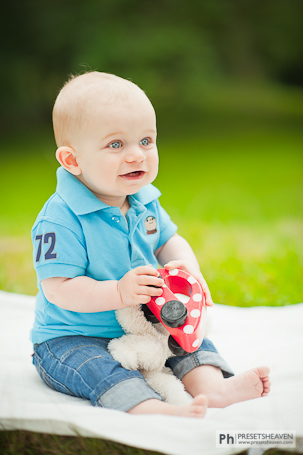
A perfect Lightroom preset to start with
Hi all readers, fans and Lightroom lovers!
Here comes another preset made by request, from Ole at our Facebook page. This is the story behind it…
Each camera has one or more profiles that controls the colors etc. when you shoot in JPEG. All this data is embedded into the JPEG file. When you shoot in RAW-mode, In short terms – that data is attached (not merged into the images) and you are able to adjust all settings before you export your photos to JPEG (or any other format) without destroying the quality of your images. Read more
Underwater preset for diving photographers
For those of you (+9300 ppl right now!) following me on Facebook, you’ve probably noticed that sending requests for a specific preset might be successful.
Lawrence Lim recently asked for a Lightroom preset that could enhance his underwater photos. Since my own underwater photos look terrible (well, using a cheap disposable underwater camera didn’t quite meet the standard I was looking for when I was scuba diving in Thailand some years ago :-/ ) I asked for some sample images to work with. The image below is credited to Lawrence Lim and not me.
Most common thing about underwater photography is that light is the key to success. I’f you’re not a Pro and do underwater photography for a living, the equipment might not be affordable. Another thing is that almost everything look blue/green down “there”. So what I did in Lightroom was to adjust the saturation of the colors and added some contrast and clarity to make the photos look more crisp. Without proper light the photos tend to look dull.
This preset works best when the object, a fish perhaps? :-), is surrounded by blue water or any blue tones. Read more
A preset for perfect light conditions
This is a request I got from Presets Heavens Facebook fan page.
Recently I had a fun photo session with a 7 month young kid. During the session the sky was all covered with foggy clouds. Perfect light conditions for a photographer. All I did in Lightroom was to add some fill light, brightness and sharpen to the images. Finally I also did some adjustments with the adjustment brush to lighten up the eyes a bit. This is the result and the preset that came out of it… Read more