

If you’re using the 64-bit version of Lightroom, you’ve probably noticed the lack of support to burn your images directly to CD. There is a pretty ugly workaround if you really need this feature.  When you install Lightroom on a 64-bit OS, the installer recognizes your system and chooses to install the 64-bit version of the software. Nice if you’re a novice but not so nice if you really need the Burn-to-CD feature to work.
The reason why the built-in burning feature doesn’t work in the 64-bit version is because the third-party library Adobe used for disk burning on Windows, did not have a 64-bit version!
The workaround is simple. Just reinstall Lightroom BUT use the 32-bit installer instead. To find the 32-bit installer, look in your extracted installer package, in the “Adobe Photoshop Lightroom 2.0” folder, for a file called “setup32.exe”.
The 64-bit version of Lightroom is optimized for computers with 64-bit processors. In short terms that means if you’re using the 64-bit version of LR on a 64-bit OS, the software should be more stable and work faster. Consider this before you reinstall to the 32-bit version though it might be slower.
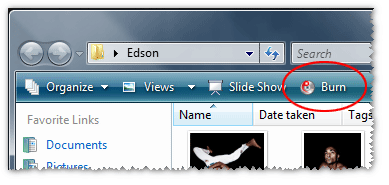
If you can live without the built-in CD burning feature, you still can use Vista’s own burn feature. Just export your images to a folder on your computer. Open the folder including the exported images and press the “Burn icon”.


Interesting! Thanks, now I can Burn My CDs.
Found out that you can install both versions (32- and 64-bit) at the same time, and can use them interchangeably on Windows 7. I use the 64 bit version for most of my work, and use the 32-bit when I need that CD-burning capability on-location. Since both versions use the same catalog, any changes made in one will reflect in the other. Just only open one at a time.
To know which one to use on Windows 7, just hover over the icon on the quick-launch and it will tell you. The 64-bit says it’s Lightroom 64-bit, and the 32-bit only shows the name (no 32-bit).